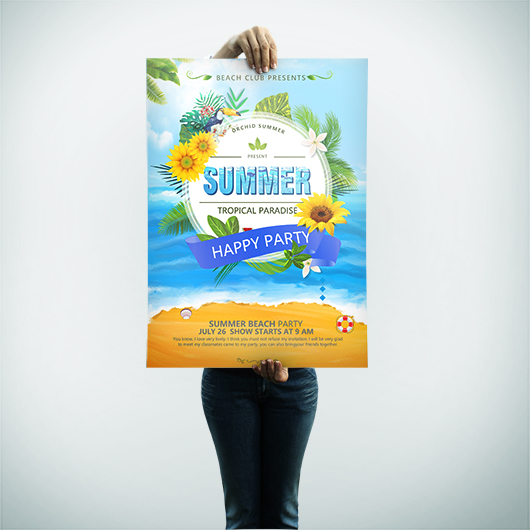
A great design or visual concept can be really brought to light when posters are printed professionally. When creating custom poster it is crucial to have the proper resolution, color scheme, and format. Whether your are looking to create a movie poster, event poster, concert poster or graphic design poster, we have the right tips for you below before going to print.
Pixels are the small dots that comprise a digital picture. The more pixels present in a picture then the higher the resulting resolution. For large format prints like custom posters it is crucial to start with high resolution images.
SETTING YOUR DIGITAL CAMERA RESOLUTION TO HIGH
When using digital images captured on a camera there are some camera settings that will help ensure that your picture is of the highest quality resolution for going to large format poster printing. Maybe sure your camera settings enable the highest possible resolution.
When measuring the resolution of image files before going to print nearly all professional printers require a minimum of 300 dpi (300 pixels or “dots” per inch). This is the standard minimum resolution for large format printing.
You can go with lower resolution images (less than 300 dpi) when printing large posters or banners that will be viewed from a great amount of distance (think store banner sized intended to be viewed from ongoing traffic). But for most custom posters that will be viewed from up close 300 dpi is the required image resolution.
Dot/inch – Pixel/inch
Conversion Table
1 dpi = 1 ppi
2 dpi = 2 ppi
3 dpi = 3 ppi
4 dpi = 4 ppi
5 dpi = 5 ppi
6 dpi = 6 ppi
7 dpi = 7 ppi
8 dpi = 8 ppi
9 dpi = 9 ppi
10 dpi = 10 ppi
11 dpi = 11 ppi
12 dpi = 12 ppi
13 dpi = 13 ppi
14 dpi = 14 ppi
15 dpi = 15 ppi
16 dpi = 16 ppi
17 dpi = 17 ppi
18 dpi = 18 ppi
19 dpi = 19 ppi
20 dpi = 20 ppi
21 dpi = 21 ppi
22 dpi = 22 ppi
23 dpi = 23 ppi
24 dpi = 24 ppi
25 dpi = 25 ppi
26 dpi = 26 ppi
27 dpi = 27 ppi
28 dpi = 28 ppi
29 dpi = 29 ppi
30 dpi = 30 ppi
COLOR MATCHING FROM RGB TO CMYK
All professional printers use CMYK or Cyan, Magenta, Yellow and Key (black) as the standard setting on printers when going to print. CMYK is also the basis when it comes to the ink used in printing full color materials. On the other hand RGB or Red, Green, Blue is the standard used on most computer monitors when displaying images on a screen. Given this discrepancy you must convert the color mode of the monitor for your laptop or desktop from RGB to CMYK for a more precise color match from your poster layout as it appears on the screen to the printed copy which will appear on the paper of your custom poster .
Nearly all professional printing services require that your files have been converted from RGB to CMYK.
Color
Color Name
(R,G,B)
Hex
(C,M,Y,K)
Black
(0,0,0)
#000000
(0,0,0,1)
White
(255,255,255)
#FFFFFF
(0,0,0,0,)
Red
(255,0,0)
#FF0000
(0,1,1,0)
Green
(0,255,0)
#00FF00
(1,0,1,0)
Blue
(0,0,255)
#0000FF
(1,1,0,0)
Yellow
(255,255,0)
#FFFF00
(0,0,1,0)
Cyan
(0,255,255)
#00FFFF
(1,0,0,0)
Magenta
(255,0,255)
#FF00FF
(0,1,0,0)
Here is an example of the RGB image converted to CMYK. Notice how they differ in color:
Image in RGB format
CMYK image after conversion
Select Between Bulk or Large Format Posters
Advances in digital printing have allowed for high quality printing of posters on different paper sizes. You can now choose from a wide range of customized poster sizes anywhere from 8″ x 8″ to as large as 120” x 59”. At Guru Printers we offer two types of custom digital poster printing in bulk or large format. For the most cost-effective and budget friendly poster printing we recommend large format for smaller quantities of poster runs and our bulk option for those looking to print larger quantities
Specs
Bulk Posters
Large Format Posters
Quantity
50–100,000 pieces
1-50 pieces
Size
Can print from 8.5″ x 11″ to 27″ x 39″
Can print from 8″ x 8″ to 120” x 59”
Stock/Substrate
100 lb. Paper Gloss
100 lb. Paper Matte
80 lb. Paper Gloss
10 pt. Cardstock Gloss
10 pt. Cardstock Matte
High Gloss
Semi-Gloss
Price
More affordable for large orders
More affordable for short run orders
Turnaround Time
1-3 Business days
1-3 Business days
Acceptable File Formats
Bitmap images or raster images are essentially pixels on a grid. Keep in mind that resizing of raster images affect the quality and resolution of the image. A good example of a raster or bitmap image is your typical scanned photo. Formats for bitmap file are in .bmp, .jpeg or .psd.
Vector Images comprise of shapes and lines with varying attributes of color, fill and outline. Vector images are not defined by pixels, so they render at a very high quality. Unlike bitmap or raster images resizing or scaling of the images has no impact on the image resolution or quality. Vector images take up smaller file size and are not recommended for posters that incorporate photographic images requiring high quality reproduction.
Here are some of the common file types used in custom poster printing.
File Extensions
Description/Program Used
.jpg or .jpeg
Standard format for photographic image compression developed by the Joint Photographic Experts Group
.psd
Bitmap file created using Adobe Photoshop
.ai
Adobe Illustrator drawing or vector graphics file
.eps
Encapsulated postscript image file created using Adobe Illustrator; designed for high resolution printing of illustrations; standard file format for importing and exporting PostScript files
.cdr
Corel Draw Vector drawing file
.tiff
Tag Image File Format; preferred bitmap graphics format for high-resolution postscript printing
.indd
InDesign Document from Adobe Systems
Portable Document File from Adobe Acrobat
.pub
Document file associated with Microsoft Publisher
SELECTING THE RIGHT PAPER FOR YOUR CUSTOM POSTERS
The type of paper you print your custom poster on plays a large role in the overall look of your poster. For more vibrant colors we recommend glossy paper that brings a sheen and gloss which attract the eyes from a distance. If you want to go with a more unique or unconventional look and do not care much for the glossy look, we also offer matte finish print paper.
TYPES OF PAPER WE OFFER:
High Gloss
Great for color vibrancy and wide color ranges. Recommended for low light settings as bright lighting can cause glare as well as making any smudges or fingerprints from handling visible. However, given the smooth glossy surface most fingerprints can be easily wiped off with cloth at no detriment to the integrity of the print.
Semi-Gloss
Our most requested and popular type of poster paper has slightly less gloss than our high gloss option resulting in less glare in bright lighting and fewer visible smudges or fingerprint marks that may appear from handling.
Matte
Our matte paper has the least amount of luster or shine compared to our high gloss or semi-gloss papers. We often have customers choose this option for a more elegant look fit for graphic design or decorative posters.
Leave a Reply