


Custom Foam Board Cutouts

  • Width *

    Min: 24Max: 48

  • Height *

    Min: 24Max: 96

  • Sides *

  • Artwork *

  • Turnaround Time *

  • Upload (Front) *

    Max file size: 200 MBPermitted file types: jpg jpeg jpe gif png pdf eps

  • Upload (Back) *

    Max file size: 200 MBPermitted file types: jpg jpeg jpe gif png pdf eps

  • Calculation *

  • Weight Calcultion *

Custom Foam Board Cutouts Printing Specifications:

Sizes Available:

  • Sizes range from 24″ x 24″ up to 48″ x 96″

Material:

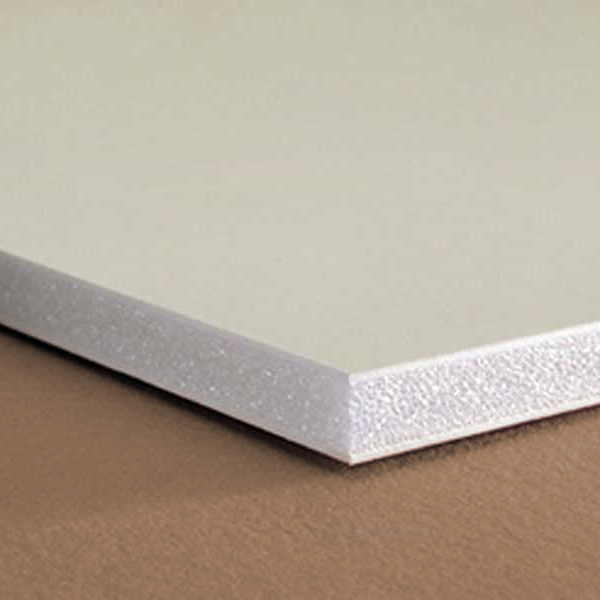
  • 3/16″ Foam core mounted prints available in Single-sided or Double-sided prints


The Ultimate Guide to Custom Foam Board Cutouts

Custom foam board cutouts have become an increasingly popular choice for businesses, events, and personal projects. These lightweight, durable, and versatile cutouts offer endless possibilities for creative displays, promotional materials, and decorative pieces. In this comprehensive guide, we’ll explore everything you need to know about custom foam board cutouts, from their benefits and applications to the design and production process.

What Are Custom Foam Board Cutouts?

Custom foam board cutouts are graphics, images, or shapes printed and cut from foam board—a sturdy yet lightweight material composed of a foam core sandwiched between two layers of paper or other materials. The foam board is typically made of polystyrene, giving it a rigid structure, while the outer layers provide a smooth surface for printing high-quality images.

These cutouts can be produced in virtually any shape or size, making them ideal for a wide range of applications. From life-sized standees to intricate designs for art installations, custom foam board cutouts are a versatile solution for both temporary and long-term displays.

Benefits of Custom Foam Board Cutouts

  1. Versatility
    • Foam board cutouts can be used for a variety of purposes, including marketing, education, decoration, and entertainment. Their adaptability makes them suitable for both indoor and outdoor use, provided they are handled with care.
  2. Lightweight and Easy to Handle
    • Despite their rigidity, foam board cutouts are incredibly lightweight, making them easy to transport, install, and reposition. This is especially advantageous for trade shows, events, and presentations where portability is key.
  3. Customizable
    • Foam board cutouts can be customized to match your specific needs. Whether you need a detailed product replica, a large company logo, or a whimsical character for a themed event, custom foam board cutouts can be tailored to your exact specifications.
  4. Cost-Effective
    • Compared to other signage and display materials, foam board is relatively affordable. It offers a cost-effective solution for creating professional-looking displays without breaking the bank.
  5. High-Quality Printing
    • Foam boards have a smooth surface that is perfect for high-resolution printing. This allows for vibrant colors, sharp images, and crisp text, ensuring that your cutouts look polished and professional.

Common Applications for Custom Foam Board Cutouts

  1. Event Signage and Decor
    • Foam board cutouts are widely used at events, including weddings, parties, corporate gatherings, and trade shows. They can serve as directional signs, photo backdrops, or decorative elements that add a personal touch to the occasion.
  2. Marketing and Advertising
    • Businesses often use foam board cutouts for promotional purposes. These cutouts can be displayed in storefronts, at point-of-sale locations, or during special promotions to attract attention and convey key messages.
  3. Retail Displays
    • In retail environments, foam board cutouts are used to create eye-catching displays that highlight products, sales, or seasonal themes. They can be shaped into product replicas, brand mascots, or other creative designs that enhance the shopping experience.
  4. Educational Tools
    • Foam board cutouts are also effective educational tools. Schools, museums, and other institutions use them to create interactive displays, visual aids, and informational graphics that engage and inform audiences.
  5. Theatrical and Film Props
    • In the entertainment industry, custom foam board cutouts are frequently used as props in theater productions, films, and photo shoots. Their lightweight nature and ease of customization make them ideal for creating realistic, yet easily manageable, set pieces.

Design and Production Process

  1. Designing Your Cutout
    • The first step in creating a custom foam board cutout is designing the image or shape you want to produce. This could be a photo, logo, graphic, or any other visual element. When designing, consider the size, shape, and resolution of the image to ensure it will print clearly on the foam board.
    • Vector Graphics: For logos and simple shapes, vector graphics (created in programs like Adobe Illustrator) are ideal because they can be scaled to any size without losing quality.
    • High-Resolution Images: For photographs or complex designs, ensure your image is high-resolution (300 DPI or higher) to avoid pixelation when printed.
  2. Choosing the Right Foam Board
    • Foam boards come in various thicknesses, typically ranging from 3mm to 10mm. Thicker boards offer greater durability and are less prone to bending, making them suitable for larger cutouts or long-term use.
    • Standard Foam Board: Commonly used for indoor displays, this type offers a balance of lightweight structure and smooth printing surface.
    • Ultra-Board or Gator Board: For more durable applications, ultra-board or gator board options are available. These have a denser core and stronger outer layers, making them resistant to dents and damage.
  3. Printing and Cutting
    • Once your design is finalized, it’s printed directly onto the foam board using large-format printers. After printing, the foam board is cut into the desired shape using a precision cutting tool, such as a CNC router or a laser cutter.
    • Contour Cutting: This technique allows for intricate shapes and detailed edges, giving your cutout a professional and polished look.
    • Kiss Cutting: For more complex designs with multiple elements, kiss cutting can be used to create partial cuts that allow pieces to be easily removed and assembled.
  4. Finishing Options
    • Depending on the intended use, you may choose to add a finish to your foam board cutout. Options include:
    • Lamination: Adding a laminate layer can protect the print from scratches, moisture, and UV light, extending the life of your cutout.
    • Mounting: For added stability, cutouts can be mounted on a stand or base, making them freestanding and easy to display.

Tips for Using and Maintaining Foam Board Cutouts

  1. Handling with Care
    • Although foam board is durable, it can be susceptible to dents, bends, and scratches. Handle your cutouts with care, especially during transport and installation.
  2. Storing Properly
    • When not in use, store your foam board cutouts in a cool, dry place away from direct sunlight. If possible, lay them flat or store them upright to prevent warping.
  3. Indoor vs. Outdoor Use
    • While foam board cutouts are primarily designed for indoor use, they can be used outdoors for short periods if properly protected. Consider adding a weather-resistant coating or placing them in a sheltered area.

Conclusion

Custom foam board cutouts are an incredibly versatile and effective solution for a wide range of applications, from event decor to marketing displays. Their ease of customization, high-quality printing, and affordability make them an attractive option for anyone looking to create impactful visual displays. By understanding the design and production process, you can create foam board cutouts that not only meet your needs but also exceed your expectations. Whether you’re planning a wedding, promoting a business, or staging a theatrical production, custom foam board cutouts are a creative and practical choice that will help you stand out.

Shipping Timeframes

California

shipping times based on Pacific Standard Time product shipping information
Guru Printers produces all orders respective to when they are processed and batched on the production queue. Although, we try our best to produce all orders accordingly based on your geographical proximity to a production facility, we cannot make any guarantees that your item will be produced out of a specific location.

File Setup

In order to ensure your files are print-ready, we recommend that you upload them in PDF format. When you generate a print-ready PDF, your computer will use the settings in Adobe Acrobat Distiller or any other PDF generating programs you may use. Please make sure that these are set properly before generating your PDF file.

If you are uploading PDF files created in Photoshop, please be sure all layers are flattened.

We also accept .JPG (JPEG), and .TIF (TIFF) file types, however PDF is the preferred format.

Check your file to make sure it meets our file creation guidelines. This will help speed up the production of your project and give your printed piece the best results.

  1. Use the CMYK colorspace (Cyan, Magenta, Yellow, blacK). These are industry standard printing colors. CMYK colors are different than RGB (Red, Green, Blue), which are used to display colors on your screen.
  2. Use a minimum resolution of 300 dpi for image files.
  3. Specify trim area with crop marks. (Don’t place crop marks inside the work area.)
  4. Artwork should have 1/8″ (0.125″) bleed extending past the trim line. This is to prevent minor cutting variations from leaving unintended results at the trim edge.
  5. Safe Area is the 1/8″ (0.125″) area inside the trim line. Do not put critical information or images within the Safe Area. This is to prevent minor cutting variations from leaving unintended results at the trim edge.
  6. If you want printed borders, they must be placed a minimum of 1/8″ (0.125″) inside the trim line and include bleed. This is to prevent minor cutting variations from leaving unintended results at the trim edge.

View our File Setup Templates